


Installing a CPU cooler used to be an extremely easy and straightforward operation until the dawn of third-party coolers. Previously, processors used to come with a stock air cooler, as they did not produce much heat, but as processors got more powerful, that metric skyrocketed. The major chip manufacturers, namely Intel and AMD, have realized the buying patterns of consumers who tend to discard the stock cooler for a third-party one. Thus, they have almost stopped bundling one in the first place, which reduces e-waste and lowers costs.

Related
MSI’s New MAG CORELIQUID I360 AIO is Cooler with Less Cables
AIO liquid coolers don’t have to be unreasonably expensive or difficult to install. The MAG CoreLiquid I360 aims to convert air-cooling diehards.
Air coolers and AIOs are a substantial upgrade over stock CPU coolers as they offer exponentially better cooling performance and look the part. Although these are a bit tricky to install, with the help of this guide, you can effortlessly slap on a third-party cooler in no time. Depending on the chip manufacturer, the process may vary, but generally, it’s quite uniform. This guide will primarily focus on how to mount a cooler on current-generation processors.
In this guide, we will talk about the steps necessary to install air-coolers and AIOs on both Intel and AMD motherboards. Although the majority of the steps are identical for both manufacturers, there are certain differences in the mounting process, especially regarding the brackets and backplates. While AMD motherboards include a backplate, Intel requires one to mount any type of cooler except the stock ones.
Preparing the motherboard
Place the motherboard on top of its box for a stable working surface. If you’re using an AMD processor, then unscrew the mounts around the CPU socket and keep them somewhere safe. For Intel processors, the motherboard will not have the two brackets pre-installed. Proceed to slot in the CPU for which you can check our guide on installing a processor. Refer to the cooler’s manual to find the correct mounting gear for your processor and motherboard combination.
Grab a dish or Tupperware before you begin and use this to make small parts, such as screws, easily accessible and difficult to misplace.

Related
The Best RGB CPU Coolers in 2024
RGB lighting is all the rage when it comes to PC gaming. Here are some of our performing cooling options with excellent RGB in tow!
Installing Stock Air-Coolers

AMD motherboards have a pre-installed backplate with four holes where the cooler can be screwed into. For Intel, there is no backplate pre-installed, so you just need to place the cooler over the processor, press the four pins on the cooler so that they snap into place, and screw the pins alternatively until fully secured. Plug the fan cable into the CPU fan header by referring to the motherboard’s manual.
If you’re worried about being properly aligned, only screw the pins most of the way, then go back around and tighten them up. If there are any problems with your alignment, it will be easier to correct while the pins are still slightly loose.
Installing Third-Party Air-Coolers

The AMD parts will include 4 cylindrical plastic pieces[1] that go over the standoffs on the motherboard. Find the metal bracket[2] within the CPU cooler box and align its holes with those of the plastic pieces. The metal bracket can be fixed in place with 4 screws which come with the cooler. In the case of Intel, look for a backplate[3] within the box’s contents and place it behind the motherboard by aligning it with the holes around the CPU socket. You might need to adjust the ends of the backplate by sliding them in or out to fit the holes in the motherboard. Depending on the cooler, you might need to attach the mounting brackets on the standoffs of the backplate or the cooler’s baseplate.
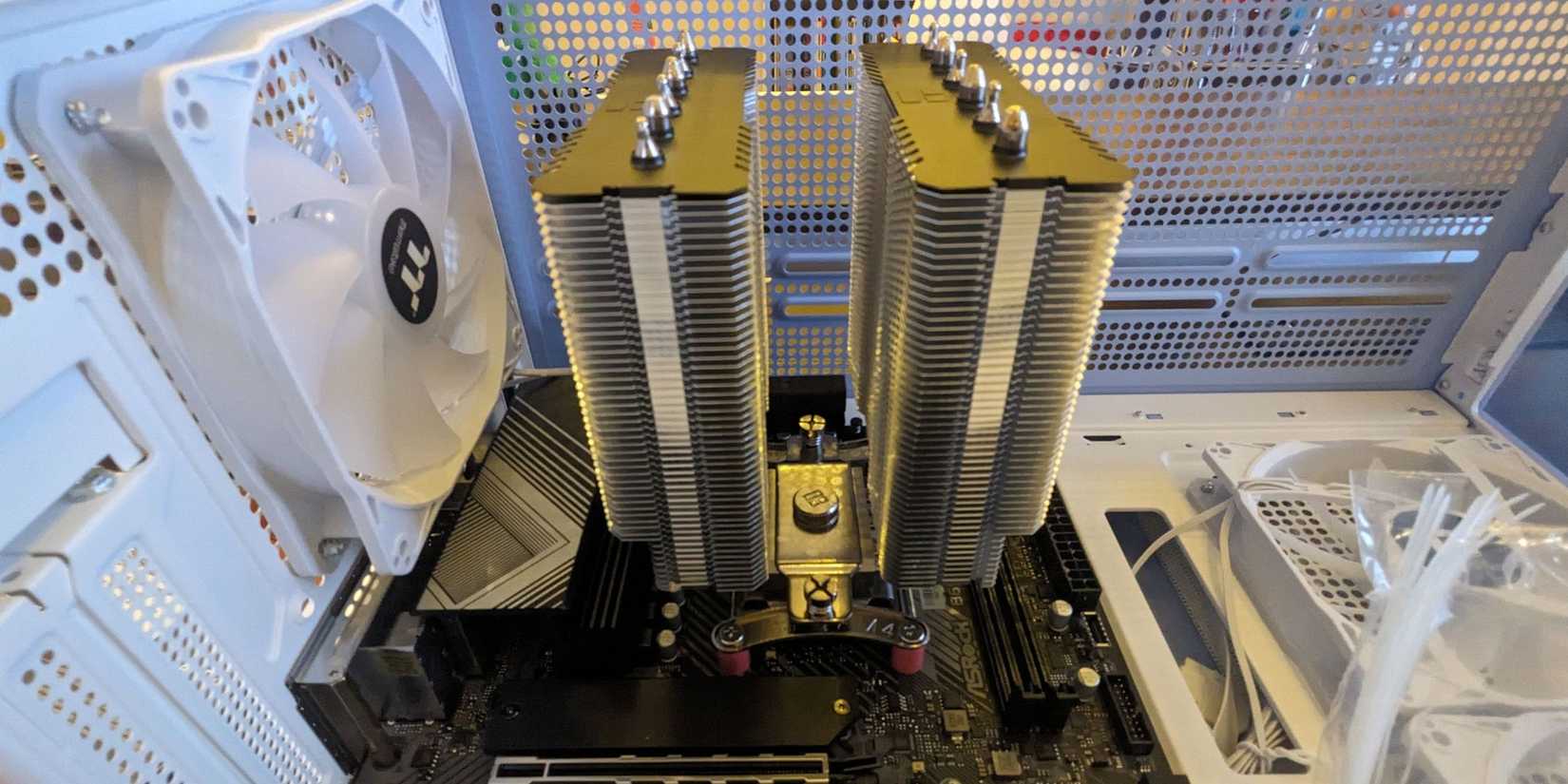
Apply thermal paste using either a pea-shaped droplet (which will spread with pressure) or simply spread it evenly over the processor manually. This step can be skipped if the heatsink comes with thermal paste pre-applied. Make sure to peel off any protective covering over the heatpipes, which will come in contact with the processor. Carefully place the heatsink over the processor while aligning the two screws on either side of the heatsink with the holes in the metal bracket. The heatsink can only fit in a vertical orientation and not horizontally. Tighten each screw just a bit and keep alternating until both of them are secured.

Related
Modern CPUs often require powerful and sustained cooling to maximize their overclocked performance. Here are some of Game Rant’s best picks!

Align the CPU fan against the cooler on either side, ensuring the airflow is towards the heatsink. The fan will have an airflow-indicating arrow for reference. Secure the fan using the two metal clips[4] that also come with the cooler. The clips have two ends which go into two tiny holes in the fan and the other end latches on to the grooves of the heatsink. Do it on both sides of the fan to hold it in place. Now connect the fan cable to the CPU_FAN header on the motherboard, and you’re done. In case the fan is RGB, there will be another cable that needs to be connected to the 4-pin RGB header. ARGB fans need a 3-pin connector.
Installing AIOs

Some water blocks come with a mounting bracket fixed in place. Others, however, will need to be attached. In case the bracket isn’t attached, look for it in the box, and screw it on the water block. Carefully follow the manual for this part, as it varies from cooler to cooler. For Intel motherboards, you will need to install the backplate and then four standoff screws before placing the waterblock.
Once the bracket has been attached, you need to start working on the radiator and its fans. Determine where the radiator should be mounted per your preferences while maintaining optimal AIO functioning. Typically, the radiator is mounted on the top of the case, but you may choose to put it on the front or side, if your PC case allows. Once you have decided in which orientation you want the radiator to be mounted, attach the fans that came with the AIO onto the radiator. Make sure the fans are pushing air out of the case through the radiator.

Apply some thermal paste as we discussed above, and screw the water block onto the four standoffs surrounding the processor. Make sure not to tighten a screw all the way, but give it a few twists before moving on to another one and keep doing it until all the screws are tightened. This helps maintain an even contact with the CPU just as with air coolers.


Related
Cooling high-end gaming chips can be a difficult task. With these AIO coolers, say goodbye to high temps and be prepared for great performance.
The last step involves plugging in the cables. The CPU pump fan goes into the CPU_FAN or similar header, usually at the motherboard’s top. The ARGB fan cable will go into a 3-pin RGB header and non-ARGB ones go into 4-pin headers. Refer to the motherboard’s manual to locate the headers.

More
Cooler Master MasterLiquid 360 Ion Flagship AIO Cooler Gets a White Edition
Cooler Master MasterLiquid 360 Ion White Edition brings flagship cooling performance for all-white gaming PCs.
FAQ
Q: Should I get an air cooler or AIO?
It depends on the heat production of the CPU under load. Processors like 10th/11th generation Intel Core i3/Core i5 as well as AMD processors like the Ryzen 5 7600/7600X or the Ryzen 7 7800X3D can run fine with air coolers. More powerful processors can benefit from an AIO as they run too hot for most air coolers to handle.
Q: What is the best way to apply thermal paste?
Thermal paste is necessary for efficient thermal conductivity between the CPU and the cooler/pump. A thin layer of thermal paste is all you need for this purpose, which can be achieved by placing a pea-sized dab of thermal paste or spreading out the paste using a small spatula. Some coolers come with thermal paste pre-applied, eliminating the need to apply thermal paste on the CPU.
Q: Which is more reliable: an Air Cooler or an AIO?
Air coolers are much simpler than AIOs in terms of design and components used. They are easy to maintain as the only electrical component is the fan, which can be replaced cheaply. AIOs are more complex as they involve tubing and coolant running through them and the waterblock. Leaking coolant can damage the PC, and fixing a malfunctioning waterblock can be cumbersome. Although the AIOs are less reliable than their counterparts, current-generation models are fairly robust and offer a warrant for peace of mind.
