Close Menu
Xarkas BlogXarkas Blog
    What's Hot

    Vivo X300 Ultra Launch in India Confirmed: Check Full Specifications and Expected Price

    April 17, 2026

    OPPO F33 And F33 Pro Launched In India With 7,000mAh Battery, Dimensity 6360 Max: Check Price And Specs

    April 17, 2026

    Motorola Edge 70 Pro Launch Date in India and Full Specifications Confirmed Through Flipkart

    April 17, 2026
    Facebook X (Twitter) Instagram
    Xarkas BlogXarkas Blog
    • Tech News

      Hummer EV Price in India 2026: Complete Guide, Features, Specifications & Availability

      April 2, 2026

      Apple Vision Pro vs Meta Quest 3: The Ultimate VR Headset Showdown

      December 3, 2025

      ChatGPT told them they were special — their families say it led to tragedy

      November 24, 2025

      Beehiiv’s CEO isn’t worried about newsletter saturation

      November 24, 2025

      TechCrunch Mobility: Searching for the robotaxi tipping point

      November 24, 2025
    • Mobiles

      Vivo X300 Ultra Launch in India Confirmed: Check Full Specifications and Expected Price

      April 17, 2026

      OPPO F33 And F33 Pro Launched In India With 7,000mAh Battery, Dimensity 6360 Max: Check Price And Specs

      April 17, 2026

      Motorola Edge 70 Pro Launch Date in India and Full Specifications Confirmed Through Flipkart

      April 17, 2026

      Moto Pad 60 Pro and Moto Pad 60 Neo Get a Price Hike in India: Check New Prices

      April 16, 2026

      OPPO Reno 16 Pro Full Specifications and Colourways Revealed: Check Launch Timeline for the Reno 16 Series

      April 16, 2026
    • Gaming

      Roblox’s AI assistant gets new agentic tools to plan, build, and test games

      April 17, 2026

      How the rewards app Freecash scammed its way to the top of the app stores

      April 15, 2026

      Where Baldur’s Gate 3 Gets Player Agency vs. Narrative Control Right (and Wrong)

      April 14, 2026

      Best Fallout 4 Romance Mods

      April 14, 2026

      Scratch & Peek

      April 14, 2026
    • SEO Tips
    • PC/ Laptops

      Dell Pro 14 (AMD Ryzen AI 7 Pro 350) Review: The Sensible Choice for Everyday Office Work

      January 9, 2026

      CES 2026: MSI Unveils New Prestige, Raider, Stealth and Crosshair Laptops with Intel Core Ultra SoCs

      January 7, 2026

      CES 2026: Samsung Unveils New Galaxy Book6 Laptops

      January 6, 2026

      CES 2026: HP Shows a Keyboard-Based PC and New EliteBooks

      January 6, 2026

      CES 2026: Intel Unveils Core Ultra Series 3, Its First Platform Built on 18A

      January 6, 2026
    • EV

      Hummer EV Price in India 2026: Complete Guide, Features, Specifications & Availability

      April 2, 2026

      Here’s How Much It Costs

      November 15, 2025

      Sodium-Ion Batteries Have Landed In America. The Hard Part Starts Now

      November 15, 2025

      Mazda Begins Testing Its Long-Overdue U.S. EV

      November 14, 2025

      Volkswagen Adds Smartwatch Support For U.S. Vehicles

      November 14, 2025
    • Gadget
    • AI
    Facebook
    Xarkas BlogXarkas Blog
    Home - Featured - Best College Football 26 Slider Settings
    Featured

    Best College Football 26 Slider Settings

    KavishBy KavishJuly 11, 2025No Comments5 Mins Read
    Facebook Twitter Pinterest Telegram LinkedIn Tumblr WhatsApp Email
    Best College Football 26 Slider Settings
    Share
    Facebook Twitter LinkedIn Pinterest Telegram Email


    Messing around with slider settings is a big part of the experience in football games, and they’re back again in College Football 26. Sliders can be used to adjust a ton of different settings, such as QB accuracy, tackling, interceptions, and fumble frequency. They can be used to make incredibly unrealistic games, or fine-tune the experience for purists to get even more enjoyment out of the game.

    This guide will explain how to change slider settings in College Football 26, and give you a breakdown of the best slider settings for All-American and Heisman frequency from one of the most reputable community members.

    how to run rpo in college football 26

    Related

    Table of Contents

    Toggle
        • How to Run RPO in College Football 26
    • Dig Into Settings
    • Gameplay Options
    • Preferences
    • Wear and Tear – Impact
    • Weather – Impact – Precipitation Scale
    • Penalties
    • User & CPU
    • Minor Tweaks Can Make a Major Difference


    How to Run RPO in College Football 26

    Sometimes, you’re better off deciding to pass or rush after the ball is snapped. That’s when you’ll want to run RPO in College Football 26.

    Dig Into Settings
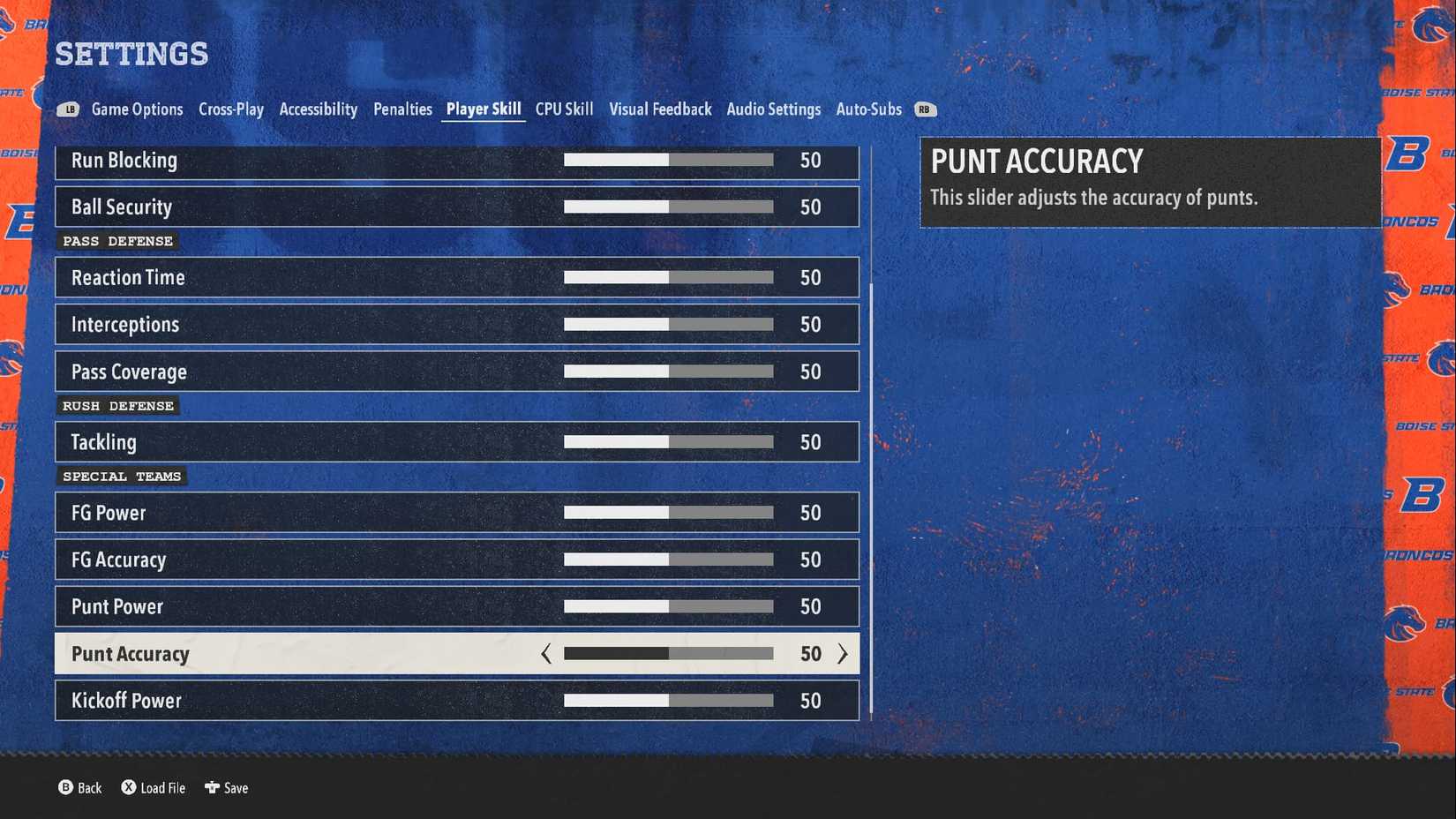
    college football 26 slider settings menu

    To change sliders, go to the ‘Settings’ menu in College Football 26 from the main menu. Within settings, there are different tabs for ‘Game Options,’ ‘Penalties,’ ‘Player Skill,’ and ‘CPU Skill.’ These tabs contain the majority of the important sliders that you’re going to want to change.

    Navigate to the tab that you want and then select the slider that you want to adjust. With it highlighted, move the analog stick left to lower the setting, or right to increase the setting.

    Sliders are set at 50 as a default, allowing you to tweak the setting an equal amount in either direction to suit your playstyle.

    When you’re happy with the changes you’ve made, click in the right analog stick (R3) to save your changes. It’s also worth noting that Wear and Tear settings must be changed within Dynasty if you want these to be applied in that game mode, too.
    increase coach trust and happines in college football 26 road to glory

    When it comes to adjusting sliders, it’s important to only make minor changes. If you go changing things without knowing the impact they can have on the game, it can drastically impact the gameplay and make for a significantly worse experience. Community member Matt10 is a name synonymous with sharing some of the best slider settings for Madden and College Football titles, and they’ve now shared their choices for College Football 26. Credit to Matt10 for his work creating and sharing these.

    Gameplay Options

    • Difficulty: Heisman/ All-American
    • Quarter Length: 11
    • Acc. Clock: On
    • Min Play Clock: 15 secs
    • Injuries: 20
    • Fatigue: 55
    • Speed Parity: 48
    • Auto-Subs: Default

    Preferences

    • Kicking: Tap & Hold
    • Passing Type: Revamped
    • Pass Slowdown: Off
    • Pass Lead Increase: Small
    • Reticle Speed: 7
    • Reticle Visibility: User Only
    • Meter Visibility: User Only
    • AI WR for User: On
    • Ball Hawk: On
    • Heat Seaker: Off
    • Defensive Switch: Off
    • Passing Cam: On

    As the name of this section suggests, these settings are more down to personal preference. Changing these to your preferred control schemes might make certain moves like lob passes easier to execute.

    Wear and Tear – Impact

    • Normal Tackle: 85
    • Catch Tackle: 85
    • Hit Stick: 85
    • Cut Stick: 85
    • Defender Tackle Advantage: 85
    • Sack: 85
    • Block: 85
    • Impact Block: 85
    • Per-Play Recovery: 35
    • Per-Timeout Recovery: 35
    • Between-Quarter Recovery: 35
    • Halftime Recovery: 35
    • In-Game/Week-to-Week Healing: 50

    Weather – Impact – Precipitation Scale

    • Catch Chance: 65
    • Pass Accuracy: 65
    • Pass Strength: 60
    • Broken Tackle: 65
    • Kicking Accuracy: 60
    • Kicking Strength: 60
    • Movement Penalty: 60

    Penalties

    • Offside: 50
    • False Start: 85
    • Offensive Holding: 85
    • Facemask: 45
    • Illegal Block in the Back: 50
    • Roughing the Passer: 45
    • Defensive Pass Interference: 50
    • Ineligible Receiver Downfield: On
    • Offensive Pass Interference: On
    • Kick Catch Interference: On
    • Intentional Grounding: On
    • Roughing the Kicker: On
    • Running into the Kicker: On
    • Illegal Contact: On

    User & CPU

    • QB Accuracy: 40
    • Pass Blocking: 50
    • WR Catching: 45
    • Run Blocking: 50
    • Ball Security: 45
    • Pass Def Reaction: 50
    • Interceptions: 45
    • Pass Coverage: 50
    • Tackling: 45
    • FG Power: 50
    • FG Accuracy: 45
    • Punt Power: 55
    • Punt Accuracy: 50
    • Kickoff Power: 50

    These slider settings are for Heisman and haven’t been tested or fine-tuned for other difficulty modes, according to Matt10. Future versions and changes of the sliders are expected in the future once he’s had further time to experiment.

    Minor Tweaks Can Make a Major Difference

    ea college football 26 rpo types explained

    Some of the best sliders to tweak for your own preferences are those around Wear and Tear. These impact how battered and bruised your players get from playing and the level of fatigue that they’ll pick up throughout the game. In the slider settings above, the 85s for impacts is balanced out by having injuries at 20. For those wanting to reduce the impact sliders (say to 50s), you’d want to increase the injury slider up closer to 40 to balance things out.

    Another slider that’s worth experimenting with is Offensive Holding. From my experience with this slider set at 85, I was getting far too many holding calls, and other players seem to be having a similar experience. I reduced ‘Offensive Holding’ down to 70, and it felt much more balanced, but you can always lower it further if you find there are still too many holding calls each game.


    Source link

    Share. Facebook Twitter Pinterest LinkedIn Tumblr Email
    Kavish
    • Website

    Related Posts

    Vivo X300 Ultra Launch in India Confirmed: Check Full Specifications and Expected Price

    April 17, 2026

    OPPO F33 And F33 Pro Launched In India With 7,000mAh Battery, Dimensity 6360 Max: Check Price And Specs

    April 17, 2026

    Motorola Edge 70 Pro Launch Date in India and Full Specifications Confirmed Through Flipkart

    April 17, 2026

    Roblox’s AI assistant gets new agentic tools to plan, build, and test games

    April 17, 2026

    Moto Pad 60 Pro and Moto Pad 60 Neo Get a Price Hike in India: Check New Prices

    April 16, 2026

    OPPO Reno 16 Pro Full Specifications and Colourways Revealed: Check Launch Timeline for the Reno 16 Series

    April 16, 2026

    Comments are closed.

    Top Reviews
    Editors Picks

    Vivo X300 Ultra Launch in India Confirmed: Check Full Specifications and Expected Price

    April 17, 2026

    OPPO F33 And F33 Pro Launched In India With 7,000mAh Battery, Dimensity 6360 Max: Check Price And Specs

    April 17, 2026

    Motorola Edge 70 Pro Launch Date in India and Full Specifications Confirmed Through Flipkart

    April 17, 2026

    Roblox’s AI assistant gets new agentic tools to plan, build, and test games

    April 17, 2026
    About Us
    About Us

    Email Us: info@xarkas.com

    Facebook Pinterest
    © 2026 . Designed by Xarkas Technologies.
    • Home
    • Mobiles
    • Privacy Policy

    Type above and press Enter to search. Press Esc to cancel.

    Ad Blocker Enabled!
    Ad Blocker Enabled!
    Our website is made possible by displaying online advertisements to our visitors. Please support us by disabling your Ad Blocker.